What does custom software really cost in 2026? Typical price ranges, what drives the number up or down, and how to get a quote you can trust.
You know your business needs software that fits the way you work. Spreadsheets are breaking, off-the-shelf tools do half the job, and your team is copying data between five systems. The question that stops most owners is simple: what is the real custom software development cost, and how do you know a quote is fair?
This guide gives you typical price ranges for 2026, explains what pushes the number up or down, and shows a step by step way to budget. The figures are typical ranges from the market, not promises. Your project may differ, and the only way to know for sure is a proper scope.
Why custom software prices vary so much
Ask three companies for a price and you might get three very different answers. That is not always a sign someone is wrong. They may be imagining different products.
"A customer portal" can mean a login page with a few documents, or a full self-service system with payments, notifications, approval flows and links to your accounting software. The words are the same. The work is not.
Price depends on four things more than anything else:
- Scope: how many screens, user roles and workflows the software needs
- Complexity: business rules, calculations, permissions and edge cases
- Integrations: connections to payment providers, CRMs, ERPs, accounting tools or government systems
- Team and location: who builds it, where they are based and how experienced they are
If you are still deciding whether to build at all, read custom software vs off-the-shelf first. Sometimes the cheapest software is the one you do not build.
Typical custom software price ranges in 2026
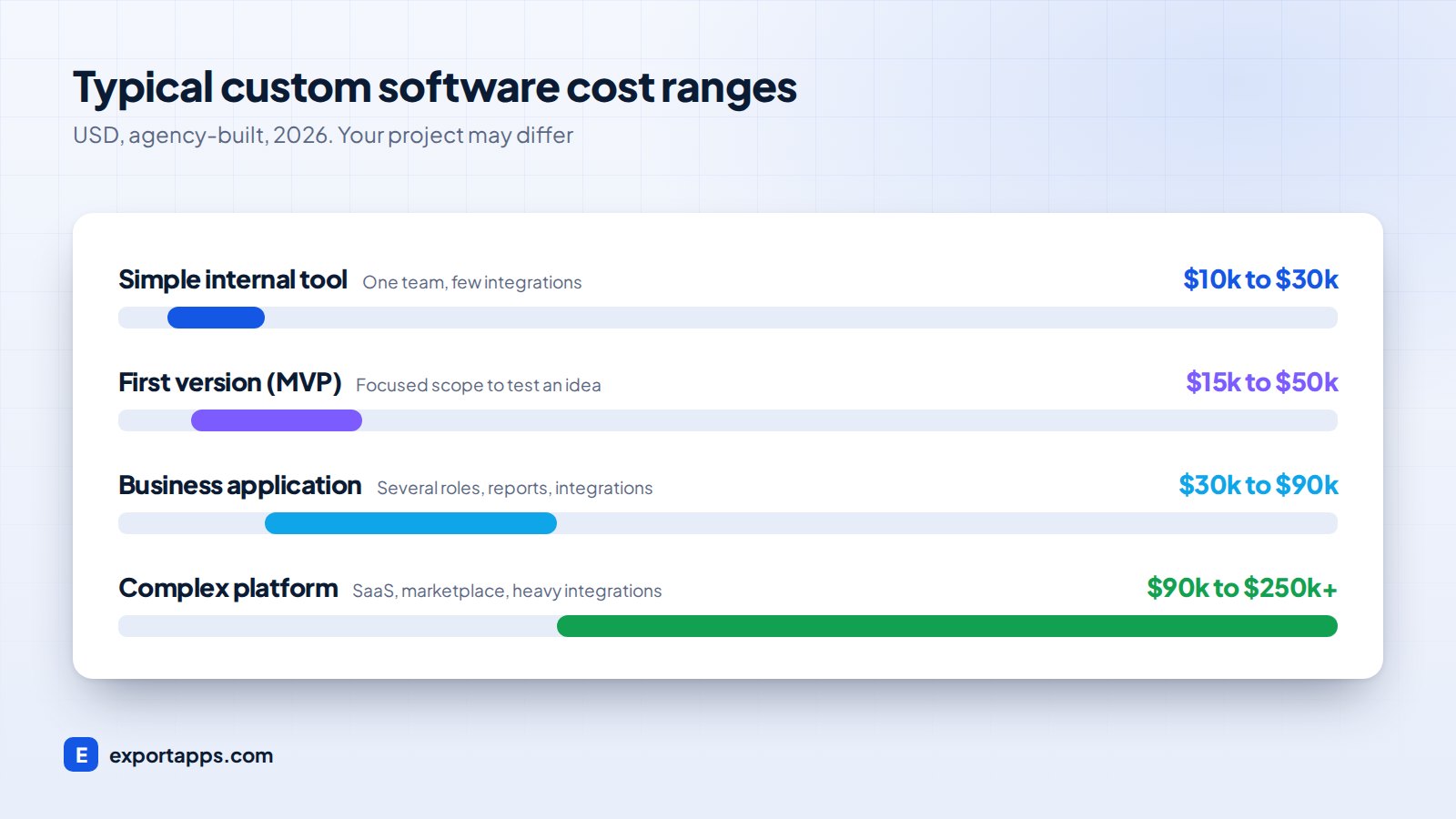
These are broad, typical ranges for projects built by a professional agency. Rough currency conversions are rounded, and your project may differ.
Simple internal tool
A small tool for one team, such as a booking tracker, an approval form or a stock list with a dashboard. Usually one or two user roles and few integrations.
- Typical range: $10,000 to $30,000 (roughly £8k to £24k, €9k to €28k, CA$14k to CA$41k)
Business application
A system that runs a core part of your operations: a customer portal, job management, a quoting tool or a field service app. Several roles, reports and a couple of integrations.
- Typical range: $30,000 to $90,000 (roughly £24k to £71k, €28k to €83k, CA$41k to CA$123k)
Complex platform
A multi-tenant SaaS product, a marketplace, or a platform with heavy integrations, advanced permissions and high security needs.
- Typical range: $90,000 to $250,000 and up
First version (MVP)
If you want to test an idea before investing fully, a focused first version is often the smartest spend. Our MVP development guide explains how to cut scope without cutting value.
- Typical range: $15,000 to $50,000
What drives the cost up (and down)
Things that add cost
- Many user roles with different permissions (admin, manager, staff, customer, partner)
- Integrations with older systems that have poor or no APIs
- Mobile apps on top of a web app. See web app vs mobile app to decide what you need first
- Data migration from years of spreadsheets or an old database
- Compliance needs such as GDPR, UK GDPR or CCPA. Our guide to privacy-compliant software covers the basics
- AI features like document reading or smart assistants, covered in AI agents for business
Things that reduce cost
- A clear, written list of must-have features
- Starting with one team or one workflow, then expanding
- Using proven building blocks for login, payments and email instead of building them from scratch
- Quick decisions and feedback from your side during the project
How hourly rates differ by region
Most quotes are built from estimated hours multiplied by a rate. Rates vary widely by region and seniority. As a rough guide, agencies in the USA, UK, Canada and Western Europe usually charge more per hour than teams in Eastern Europe, Latin America or Asia.
A lower rate does not always mean a lower total. A senior team that needs fewer hours and fewer fixes can cost less overall than a cheap team that has to rebuild. We cover this trade-off in detail in outsourcing software development.
How to budget for custom software: step by step
Follow this process and you will end up with a number you can plan around, instead of a guess.

1. Write down the problem, not the solution
Describe what is going wrong today and what it costs you. "Our team spends 15 hours a week retyping orders" is far more useful than "we need an app". It also helps you judge whether the investment pays back.
2. List users and their main tasks
For each type of user, write the three to five things they must be able to do. This becomes the backbone of your scope.
3. Split must-haves from nice-to-haves
Be strict. Launch with the features that solve the core problem. Everything else goes on a second list for later phases.
4. Run a paid discovery or scoping phase
A short discovery phase, often one to three weeks, turns your notes into user flows, wireframes and a written specification. It is the single best way to get an accurate price.
5. Get fixed quotes against the same scope
Send the same written scope to two or three companies so you compare like with like. Our guide on how to choose a software development company lists the questions to ask.
6. Add a buffer and plan running costs
Keep 10 to 20% aside for changes you discover along the way. Then plan for hosting, monitoring and maintenance after launch.
Do not forget the running costs
Building the software is only part of the total cost of ownership. Plan for:
- Hosting and cloud services, which depend on users and data volume
- Maintenance: security updates, library upgrades and small fixes. Many businesses budget around 15 to 20% of the build cost per year as a typical range
- Third-party services: email sending, SMS, maps, payment fees
- New features as your business grows
If you are moving from spreadsheets, our guide to moving from paper and Excel to online software shows how to phase the change so costs stay manageable.
Fixed price vs time and materials
Fixed price works best when the scope is clear after discovery. You know the total before work starts, and changes are priced separately.
Time and materials suits products that will evolve quickly based on user feedback. You pay for actual time, which gives flexibility but needs closer budget tracking.
Many businesses use both: a fixed price for the first release, then a monthly plan for ongoing improvements.
Frequently asked questions
How much does custom software cost for a small business?
A simple internal tool typically costs $10,000 to $30,000, and a full business application often lands between $30,000 and $90,000. These are typical ranges and your project may differ.
How long does custom software take to build?
Small tools often take 6 to 10 weeks. Business applications commonly take 3 to 6 months. Complex platforms can take longer and are usually released in phases.
Is custom software worth the cost?
It is worth it when the software saves real time, reduces errors or lets you sell something competitors cannot. If an existing product covers 80% or more of your needs at a fair price, buying is often better.
Why do quotes for the same project differ so much?
Usually because each company imagined a different scope, or uses a different team size and rate. Compare quotes against the same written specification.
Get a clear, fixed quote
At Export Apps we start with a short discovery call, write down the scope with you, and give you a clear fixed quote before any build work starts. Learn more about our custom software development services or book a free consultation to talk through your project.